 by
by
HD2 Arsenal
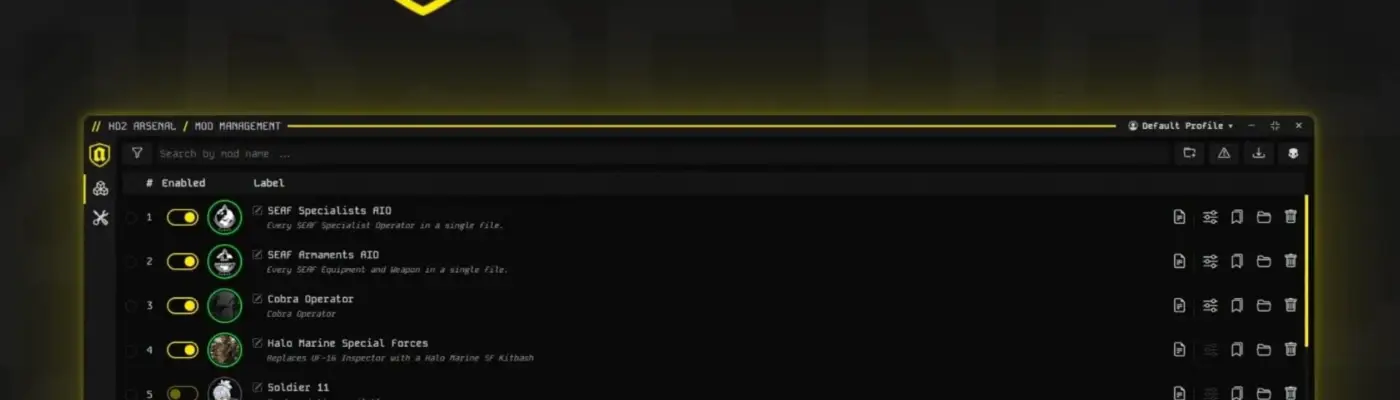
HD2 Arsenal is a Helldivers 2 mod manager designed to make customizing your game simple and enjoyable. It offers powerful tools like mod organization, tag filtering, profile creation, mod pack assembly, and automatic updates. This makes it an excellent choice for both regular players and mod developers. Since this is a beta release, please report any bugs directly on Nexus Mods or through the built-in reporting system.
Mod Management
Clean and minimalistic interface for intuitive mod handling.
Works seamlessly with any mod pack, whether it includes a
manifest.jsonfile or not.Rename individual mods to keep your collection perfectly organized.
Visual status indicators show if a mod is Deployed, Needs Redeploy, or Inactive.
Multi-selection capabilities allow you to perform batch actions quickly.
Simple toggling to turn specific mods on or off.
Manage specific mod options alongside their sub-options.
Set deployment priority by dragging and dropping items, where the top item always takes the highest priority.
Upload new mods using a simple drag-and-drop action or by clicking the upload button.
Profile system helps you sort and manage different mod loadouts effectively.
Tag-based filtering allows for quick categorization and searching.
Mod Pack Builder
Build mod folder structures directly inside the manager.
Automatically generate necessary
manifest.jsonfiles.Two-way synchronization keeps your folder structure and manifest file perfectly aligned.
Built-in code editor features standard IDE shortcuts like
Shift+Alt+DownArrowandCtrl+Z.Import and export your work using the custom
.hd2a_projectfile format.Export ready-to-play
.zipfiles with a single click.Complete compatibility with any standard HD2 Mod Manager manifest.
General Features
Available in multiple languages including English, German, Italian, French, Chinese, Spanish, Korean, Russian, and Japanese.
Automatically detects your system language upon launch.
Customizable settings for your game directories and installation paths.
Settings menu includes a toggle to automatically enable newly added mods.
Choose whether to enable all features or just the primary option when uploading a new mod.
Optional Discord Rich Presence integration lets you show your activity to friends.
Developer Mode access unlocks the powerful Mod Pack Builder tools.
Customizable notification system lets you adjust message positions or hide them entirely.
Hard Reset feature completely wipes installed mods and restores the manager to its default state.
Integrated auto-updater alerts you to new versions and allows direct installation right from the app.
