 Moonlight Peaks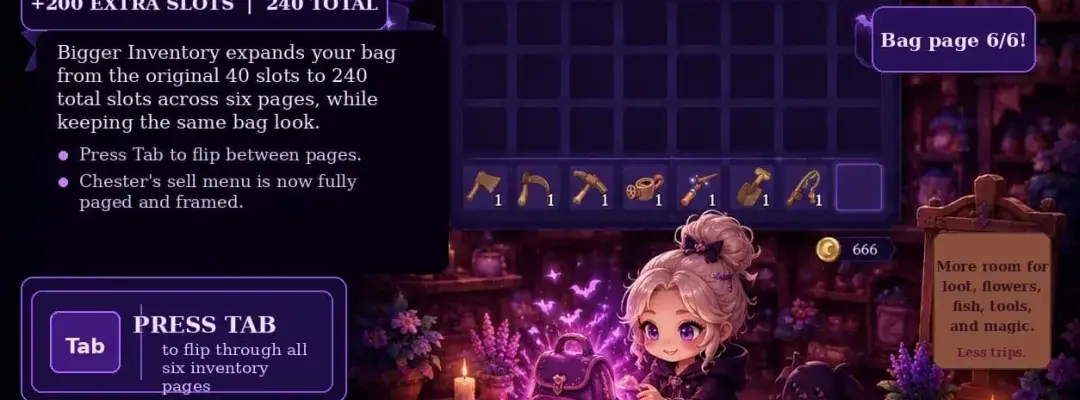
Files
Main File - Version v1.0 Latest
Jul 9, 2026 173 KB
Changelog:
Initial release
Description
Bigger Inventory
Never leave your hard-earned treasures behind again. This mod expands your carrying capacity by adding a clean, easily accessible second page to your backpack. You get double the storage space (+40 extra slots) without cluttering your UI, keeping your inventory looking completely natural.
✨ Key Features
Double the Storage: Adds a second inventory page, giving you 40 additional slots for crops, tools, fish, and materials.
Seamless Page Flipping: Simply press the Tab key while your inventory is open to cycle between pages.
Audio/Text Reminders: Your character will announce which bag page you are currently viewing (“Bag page 1/2” or “Bag page 2/2”).
Smart Auto-Overflow: When your first page fills up, newly collected items automatically deposit into the second page.
Fully Integrated System: Shops, crafting benches, and quest turn-ins recognize and pull items from both pages simultaneously.
Vanilla Visuals: The classic appearance of your bag is preserved; the extra slots are neatly tucked away on page two.
Save-File Friendly: 100% safe to install and activate in the middle of an ongoing playthrough.
📌 Prerequisites
BepInEx (Bleeding-Edge v5.4.23.4+) – Ensure you are using the x64 version and that it is fully set up before adding this mod.
🛠 Installation Guide
Confirm BepInEx x64 (v5.4.23.4+ bleeding-edge) is installed in your game files.
Download the Bigger Inventory mod files.
Drop the provided
BepInExfolder directly into your main Moonlight Peaks installation directory.Launch the game, open your backpack, and use the Tab key to switch pages.
⌨️ Mod Controls
Tab (With Inventory Open): Cycles/toggles between your two inventory pages.
📝 Important Notes
Both pages function as one massive, connected bag.
⚠️ Crucial Uninstallation Warning: You must completely empty the second inventory page before removing this mod. If you delete the mod while items are still on page 2, those items will be permanently lost when the extra slots disappear.
🗑 Uninstallation
Open your backpack in-game and move all items off of Page 2.
Close the game and delete the specific mod files from your
Moonlight Peaks/BepInExfolder.
Happy hoarding! Carry everything you need and live your absolute best vampire life without the inventory management headaches. 🌙
Rate This Mod
—
0 ratings
★★★★★
Login to rate this mod.

GlitchMancer
Trusted Modder
48 mods · 1.1K total downloads
Related Mods
Moonlight Peaks  Moonlight Peaks
  Moonlight Peaks
  Moonlight Peaks