 007 First Light
Files
Main File - Version v1.0 Latest
Jun 12, 2026
2 MB
Changelog:
Initial release
Description
Save Resigner
A simple tool that changes the SteamID on your save containers, allowing you to easily transfer your saves to another account.
How to Resign Your Save Files on 007: First Light
⚠️ Read this fully before running the tool. Most issues come from skipping steps.
1. Locate Your Save Folder
Browse to the directory where your game saves are located:
text
<Steam_Installation>\userdata\<AccountId>\3768760\remote\Note: Use https://steamid.io/lookup to get your SteamID3, which is the AccountId mentioned in the path.
2. Verify Your Directories
Ensure you see the following folders inside that directory:
-
KntProfileSaveFile -
KntProfileSaveFile-BCK-0 -
KntProfileSaveFile-BCK-1 -
KntSlotSaveFile-0 -
LocalProfile -
SystemData
(Note: You may see more folders depending on how many save slots you have filled)
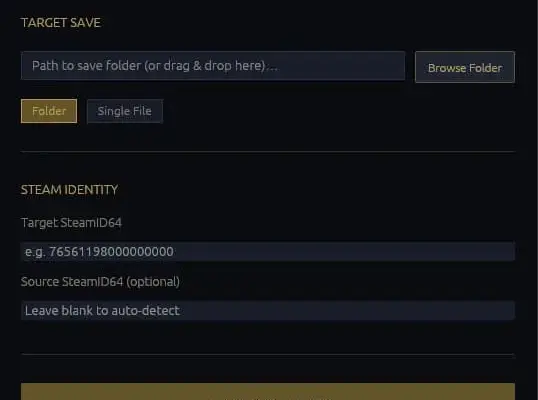
3. Run the Tool: Resign Save Tab
-
Select the remote folder (or the parent folder containing the directories listed above).
-
Enter your new SteamID into the Target SteamID64 field.
-
Click ▶ EXECUTE RESIGN at the bottom.
Backup Notice: The tool automatically backs up your folders into a Backup directory at the root of your selected path before making any changes.
4. Generate the VDF: Using the VDF Generator Tab
After resigning, you must regenerate your remotecache.vdf or Steam will not recognize your saves.
⚠️ MAKE SURE STEAM IS FULLY CLOSED AND NOT JUST THE GAME BEFORE DOING THE FOLLOWING:
-
FIRSTLY: Remove the Backup folder from the folder that was used to resign.
-
Switch to the VDF Generator tab.
-
Select the same remote folder you used above.
-
Click ⚙ GENERATE VDF. The file will be written automatically with no external tools needed.
❓ Why Isn’t My Save Loading? / Kicked Back to Main Menu
⚠️ IMPORTANT: Close Steam completely before doing any of this. If Steam is running, it will overwrite your files the moment it syncs.
If your save still isn’t loading after following the steps above, check the following:
-
Did you run the VDF Generator?
This step is mandatory, not optional. Steam uses the VDF to track your save files. Without it, your resign will not take effect. -
Did you use the correct folder?
Your resigned folders must be placed at the exact path shown at the top of this guide. Do not use a different save path. -
Did you close Steam first?
Steam must be fully closed and not just the game—the Steam client itself—before resigning and placing files.
Source code: https://github.com/Dxian998/007-First-Light-Save-Tools
Rate This Mod
—
0 ratings
★★★★★
Login to rate this mod.

PixelPhantom
Trusted Modder
22 mods · 309 total downloads
Related Mods
007 First Light
 007 First Light
 007 First Light
 007 First Light