 Crimson Desert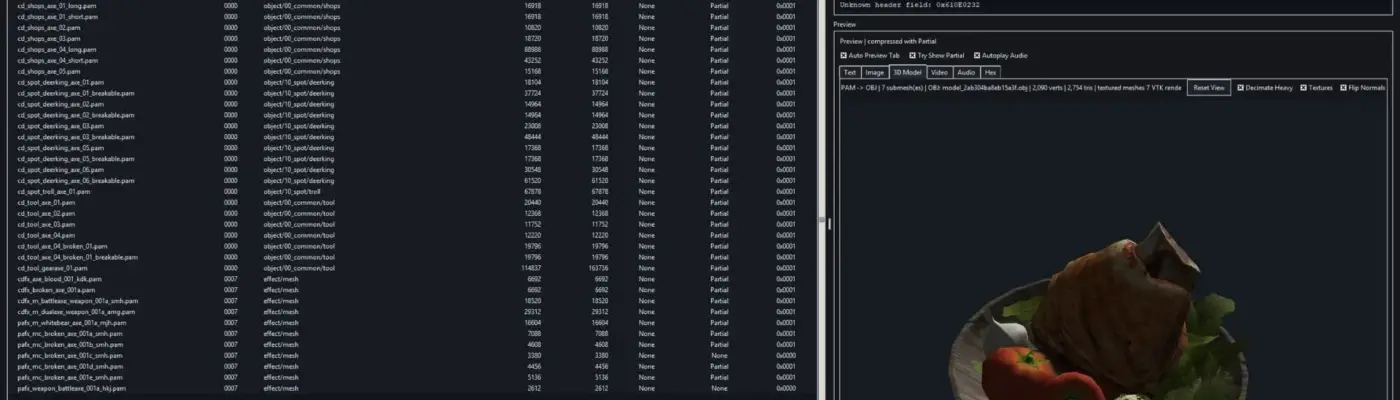
Files
Main File - Version v0.13.0 Latest
Apr 9, 2026 153 MB
Changelog:
Initial release
Description
Crimson Browser And Mod Manager is a standalone archive browser and modding utility for Crimson Desert.
Overview
Crimson Browser And Mod Manager is a standalone tool designed to browse archives and assist with modding in Crimson Desert. It reads 0.pamt metadata, lets you explore .paz archive contents, previews several common asset formats, extracts files, and rebuilds supported mod-folder or overlay VFS overrides without altering the original archives.
Requirements
To use the tool, you need:
Windows
Python 3.10 or newer
A Python installation that includes Tkinter
The Python packages listed in
requirements.txtvtkfor the built-in 3D model viewervgmstreamif you want preview support for WEM audio files
Install And Run
You can launch it with the provided EXE or batch file, or run it manually:
Install Python 3.10 or newer.
Open a terminal inside the Crimson Browser folder.
Run:
pip install -r requirements.txtMake sure
tools/vgmstream-win64/vgmstream-cli.exeis present if you want WEM preview support.Edit
config.txtand set your game path, for example:archives_path=D:PathToCrimson Desertandtheme=darkRun:
python crimson_browser.py
You can also start only the Mod Manager with python crimson_browser.py --mod-manager, use run_mod_manager.bat for direct Mod Manager startup, or launch the packaged standalone build from dist\Crimson Browser & Mod Manager\Crimson Browser & Mod Manager.exe.
The packaged standalone version is meant to work on a target machine without needing a separate Python installation or additional pip setup.
First Launch
On first startup, the tool reads the archive metadata and creates a fast cache. Future launches use that cache automatically unless you manually click Refresh Cache.
Current Features
The tool currently includes:
Archive browsing with search, filtering, sorting, and optional tree-style paths
A persistent fast cache so archives do not need to be parsed every time
Preview tabs for text, images, 3D models, video, audio, and hex data
Partial-compressed DDS preview and extraction support through
meta/0.pathcPartial-compressed DDS reimport that also updates matching
meta/0.pathcmetadataConfigurable light and dark mode stored in
config.txtExtraction of selected files or all filtered files with progress and ETA
PAM and PAMLOD extraction that also exports OBJ files automatically
.palocpreview, JSON sidecar export, and JSON reimport supportSingle-file reimport as a rebuilt
mod_folderpack-group overrideBatch folder reimport from any loose folder tree
ChaCha20 decrypt and re-encrypt support for compatible entries
Full affected pack-group rebuilds with updated
0.pamtandmeta/0.papgtAutomatic creation of new 16-byte-aligned
.pazchunks when replacements become too large for the original slotA Mod Manager UI for managed
mods/<mod>/filessources, metadata editing, enable or disable controls, and load-order priorityBuild Active Mods, which merges enabled mods into one final overlay output under
mod_build/0036plusmod_build/meta/0.papgtDeploy In Game, which uses both traditional
mod_folderoverrides and finalmod_buildoutput, with local.bakbackupsA Launch Game button for
bin64/CrimsonDesert.exeDirect Mod Manager startup with
--mod-managerorrun_mod_manager.batA Mod-Manager-only mode with its own Options and Credits buttons
A dedicated bottom status and progress bar in the Mod Manager for long operations
3D Model Viewer
The built-in 3D model viewer includes:
Embedded PAM and PAMLOD parsing
A VTK-based offscreen renderer integrated directly into the main tool
Built-in OBJ export
Left-drag rotation and right-drag light control
A Reset View button
Texture toggle
Heavy-mesh decimation toggle
Flip Normals toggle
Automatic lookup for referenced textures from loaded archives when available
PAMLOD texture lookup that also checks grouped references and DDS variants
Preservation of texture alpha and transparency in the 3D preview when available
Audio, Video, And Image Preview
Preview support includes:
WEM audio playback through
vgmstreamMP4 video preview with playback, seeking, and fullscreen support
Image preview with zoom, pan, and checkerboard transparency background
Extraction Notes
LZ4 files are extracted in decompressed form.
Partial-compressed DDS files are rebuilt into normal DDS for preview and extraction when
meta/0.pathcprovides the texture header.If a file cannot currently be decrypted or decompressed, the raw data is written out instead.
PAM and PAMLOD extraction also exports an OBJ file beside the extracted source.
Matching textures are exported next to the OBJ when found.
Reimport Notes
Original archives are never modified.
Output is written into
mod_folderas rebuilt pack-group overrides.Supported reimport types include raw entries, LZ4 entries, Partial DDS entries, clear entries, and ChaCha20-encrypted entries.
The tool updates PAZ offsets, sizes, checksums,
0.pamt, andmeta/0.papgtfor affected groups.It uses normal LZ4 recompression for rebuilt payloads instead of risky exact-size forcing.
It does not yet support non-DDS Partial entries, Zlib recompression, or QuickLZ recompression.
It also does not currently support reimport for encrypted entries outside of ChaCha20.
Fast Cache
The tool stores archive metadata and entry lists in:
crimson_cache/archive_index_cache.pkl
Use the Refresh Cache button if you want to force a full cache rebuild. The cache now relies on archive metadata signatures instead of extra live-state files, which makes fast-cache reuse more reliable for direct Mod Manager workflows.
Standalone Notes
A packaged one-directory standalone build is supported. The standalone folder includes all bundled runtime dependencies and resources next to the EXE. It also comes with run_mod_manager.bat for direct Mod Manager startup.
The Mod Manager is still somewhat messy, but it is now a portable kind of messy, which at least makes it more convenient.
Known Limitations
Reimport currently updates existing file entries only, not completely new archive paths.
Minimal multi-mod builds in
mod_buildrely on the game’s overlay system to resolve untouched original chunks from the base installation.Current runtime path evidence still suggests numeric
%d.pazchunk naming, so named chunk files are not being used at this time.Partial DDS reimport is now supported, but non-DDS Partial entries and Zlib or QuickLZ recompression are still unresolved.
Credits
Version: 0.13.0
All the knowledgeable people at ResHax, especially MrIkso and NoName
LukeFZ for
pycrimsonand.papgtstructure researchLazorr for breaking the ChaCha20 encryption and decryption and for related tools
Lathiel for model conversion scripts and foundational work
CallMeSlinky for the PATHC parsing and repack groundwork
kh0shn4w for the AutoFontModder release that helped compare exact-size font workflows
Uses
vgmstreamfor WEM audio preview support
Basic Usage
Run the EXE or batch file, or install dependencies with
pip install -r requirements.txtSet your game path in
config.txtRun
python crimson_browser.pyLet the first launch build the fast cache
Browse, preview, extract, or reimport supported files
Rate This Mod
—
0 ratings
★★★★★
Login to rate this mod.

ModForge
Trusted Modder
43 mods · 2.5K total downloads
Related Mods
Crimson Desert  Crimson Desert
  Crimson Desert
  Crimson Desert