 Deadlock
Files
Main File - Version v1.0 Latest
Jun 25, 2026
348 KB
Changelog:
Initial release
Description
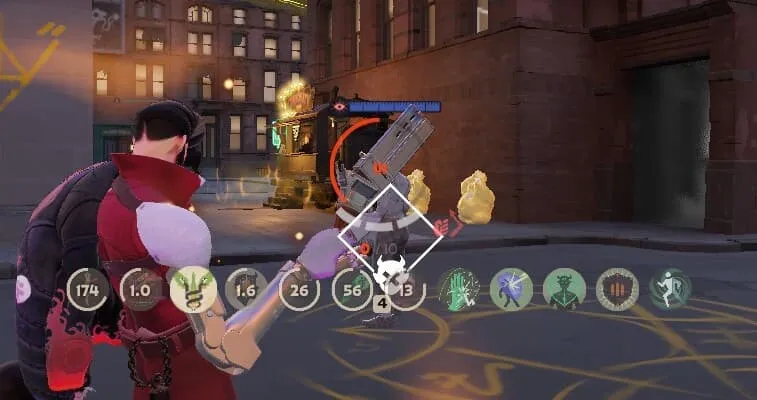
Always Show Passive Items and Actives Icons
Keeps passive and active ability icons permanently visible, so you always know exactly when cooldowns are ready no matter where your camera is pointed.
It also includes a custom passive builder. To use it, download the template filter, place the required files in the proper location, repeat that step after 8 hours, then click “Build / download archive” and put the resulting .vpk into the addon folder, and you’re done.
There are two layout options to choose from:
-
Standalone — a classic centered HUD.
-
Redesign Standalone — a debuff-style overlay above health, inspired by Soma.
You can also pick one optional filter:
-
pak03_dir.vpk — active icon mode, removes clutter, with yes behavior.
-
pak04_dir.vpk — passive-only mode, removes clutter.
-
pak05_dir.vpk — active icon mode, removes clutter, with no behavior.
These filters remove non-cooldown items such as Battle Vest, Enchanter’s Emblem, Fortitude, and similar items.
For installation, unzip one layout into addons/ and optionally add one filter .vpk.
Important: when the game patches or the filters update, stop using the mod right away and re-download it. Old filter files can cause broken or incorrect item stats, so during patch windows you should check for updates every 3–4 hours.
Rate This Mod
—
0 ratings
★★★★★
Login to rate this mod.

ScriptSavvy
Trusted Modder
52 mods · 769 total downloads
Related Mods
Deadlock
 Deadlock
 Deadlock
 Deadlock