 Mixtape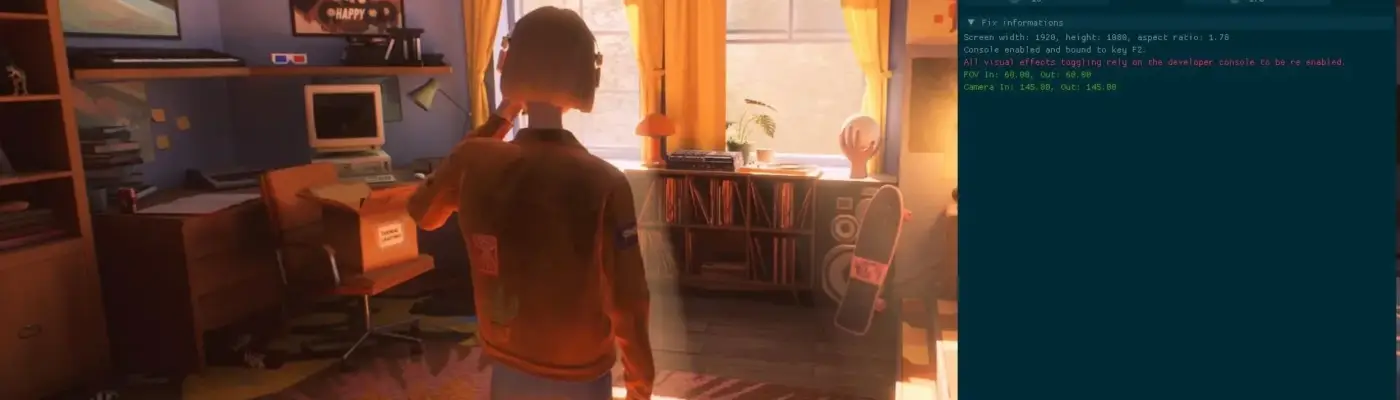
Files
Main File - Version v1.0 Latest
Jul 3, 2026 175 KB
Changelog:
Initial release
Description
Mixtape Ultrawide FOV and More
This is a ReShade addon that enables the console, ultrawide support, FOV control, camera distance adjustments, and the ability to disable certain visual effects.
Installation
First, download ReShade with addon support. Make sure you get that specific version, along with the latest one available at the time of writing, currently 6.7.3. Otherwise, this ReShade addon will not work.
If you already have an older version of ReShade installed for this game, uninstall it before installing the latest version, 6.7.3.
Install ReShade and, when prompted, select the game’s executable folder:
NewMoon\Binaries\Win64
Then choose:
Mixtape-Win64-Shipping.exe
Continue to the next step and select the game’s API: DX12.
You may also choose which effects to install, although this is not required for the addon to work. Finish the installation process.
Next, find the folder where Mixtape-Win64-Shipping.exe is located on your drive, in the same directory as above, and extract the mod archive into the same folder next to the game executable.
How to Use
Once installation is complete, launch the game and ReShade should appear automatically.
After a few seconds, press the Home key to open the main ReShade overlay.
You can then move the main ReShade overlay to access the addon overlay. For convenience, you may dock the addon panel to the main one. In the latest ReShade version, the overlay may already be docked near the About tab.
Now enable the fixes and adjust the sliders as needed.
Make sure the Fix Enabled option is checked, since it controls all of the available fixes.
That’s it.
Enjoy.
Rate This Mod
—
0 ratings
★★★★★
Login to rate this mod.

VortexModder
Trusted Modder
47 mods · 1.2K total downloads