
 Retro Rewind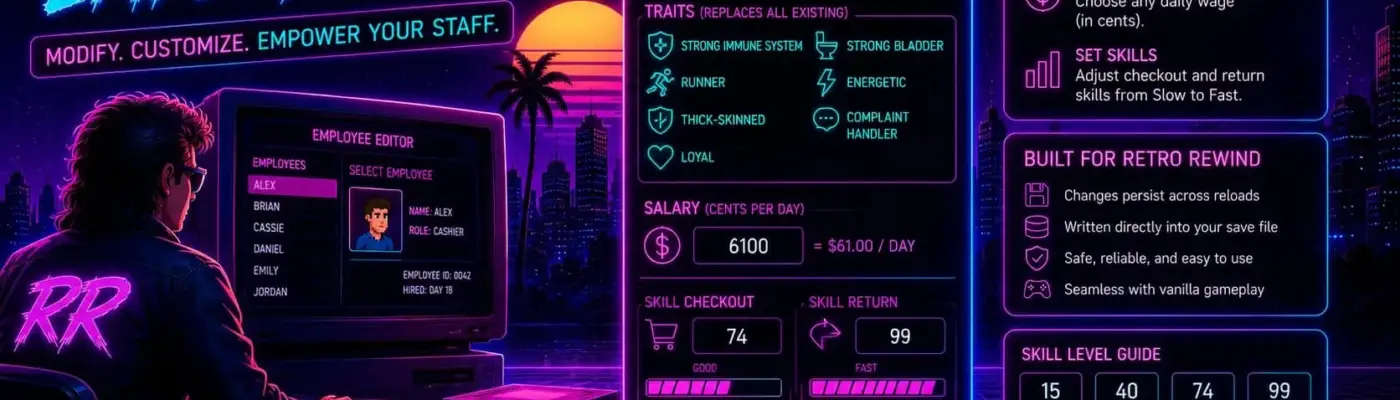
Files
Main File - Version v1.5 Latest
May 21, 2026 15 KB
Changelog:
Initial release
Description
Retro Rewind – Employee Mod
This mod allows you to permanently adjust your employees’ traits, salaries, and skill levels. All changes are written directly into your save file, meaning they remain active even after reloading.
UE4SS is required. Linux and Steam Deck users must add WINEDLLOVERRIDES="dwmapi=n,b" %command% to their Steam launch options.
Overview
Customize your staff by modifying their traits, daily pay, and work skills. Once applied, these changes are saved directly into your game file, so there is no need to reapply them after loading.
Requirements
UE4SS must be installed beforehand
Installation
Extract the downloaded zip into:
RetroRewind\Binaries\Win64\ue4ss\ModsThe archive already contains the correct folder structure, so no extra setup is required
Configuration
Open
config.luain a text editorAdd entries for each employee using their exact in-game name
Example:
text
return {

["Sarah"] = {

traits        = { 2, 3, 7 },

salary        = 6100,

skillCheckout = 99,

skillReturn   = 99,

},

["Anthony"] = {

traits        = { 3, 5, 7 },

salary        = 5000,

skillCheckout = 74,

skillReturn   = 99,

},

}
Only edit config.lua. Do not modify main.lua.
Available Settings
Traits
Define a list of trait IDs
Existing traits will be fully replaced
Available IDs:
2: Strong Immune System
3: Runner
4: Thick-Skinned
5: Strong Bladder
6: Energetic
7: Loyal
8: Complaint Handler
IDs 0 and 1 exist but have no effect.
Salary
Set daily wage in cents
Examples:
3900 = $39/day
6100 = $61/day
Skills (skillCheckout / skillReturn)
Controls performance at checkout and return stations
Values range from 0 to 99
Reference levels:
15: Slow
40: Average
74: Good
99: Fast
Important: Do not use values of 100 or higher, as this can cause errors in the game.
Movement Speed
Automatically calculated based on traits and skills
The Runner trait combined with high skills results in maximum speed
Wildcard Configuration
Use "*" to apply settings to all employees without a specific entry:
text
["*"] = {

traits = { 7 },

}
Applying Changes
After editing config.lua, save the file and load your game. Changes are applied automatically in two ways:
Play normally: Open and close your store; changes apply when the day ends and the game saves
Manual save: Use the in-game time clock, then return to the main menu and reload the save
Once applied, changes are permanently stored in the save file—even if the mod is later removed.
Uninstalling
Delete the Employee Mod folder from the Mods directory
Existing changes will remain in your save, but no further updates will occur
To restore original values, load a backup save
Save file location:%LOCALAPPDATA%\RetroRewind\Saved\SaveGames\
Changelog
v1.2
Config now applies on every save, fixing persistence issues after menu reloads
Removed developer-only keybinds
v1.1.2
Fixed an issue where changes would not apply after reloading from the menu
v1.1
Initial release
Technical Details
This mod works by hooking into the game’s “Save Game Step – AI Director” function within the Core_Gamemode Blueprint. This function runs just before staff data is written into the save object.
By modifying the data at that exact moment, the changes are embedded directly into the .sav file without requiring external editors.
The hook is registered using NotifyOnNewObject on the Gamemode class, since Blueprint functions are not available for hooking during initial mod load.
Requirements
This item needs the following to work. Install them as well:
Rate This Mod
—
0 ratings
★★★★★
Login to rate this mod.
This mod requires the following mods or tools to function properly:

ModForge
Trusted Modder
43 mods · 2.4K total downloads
Related Mods
Retro Rewind  Retro Rewind
  Retro Rewind
  Retro Rewind