 Road To Vostok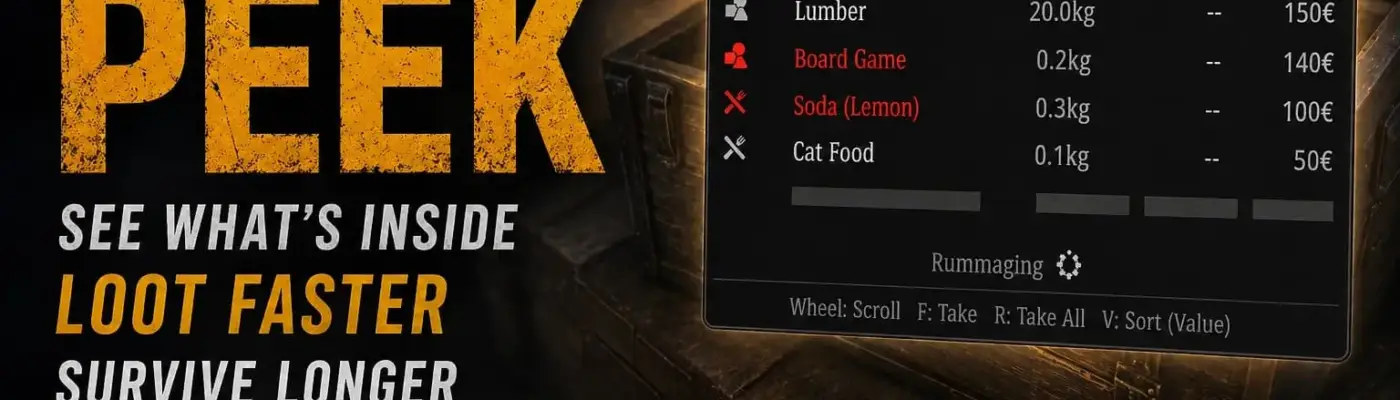
Files
Main File - Version v1.0 Latest
Jun 11, 2026 471 KB
Changelog:
Initial release
Description
Container Peek
Container Peek lets you preview a container’s contents instantly when you aim at it—no need to open the full inventory screen first.
What It Does
Instead of stopping to open every crate, drawer, freezer, shelf, or cabinet just to check if it’s worth looting, you get a compact loot window that appears only when the game already considers that container interactable. The goal is simple: faster looting, less menu friction, and better flow.
Key Features
Why Use It
The base loot loop forces you to fully open a container before deciding if it’s worth touching. Container Peek removes that dead time while staying close to the game’s interaction rules and visual style. It feels like a faster extension of the existing loot flow, not a separate overlay mod fighting the game.
Configuration (via Mod Configuration Menu)
Rebind take, take-all, and sort keys
Enable/disable rarity colors, category icons, shared input capture
Tune rummaging delay and audio
Control shelter enablement and rummaging in shelter
Adjust panel opacity, position offsets, UI scale
Enable XP & Skills System compatibility
Debug logging (session-only, resets to disabled)
Compatibility
✅ Works with Mod Configuration Menu (mandatory)
✅ Optional compatibility hook for XP & Skills System
Source & Assets
Rate This Mod
—
0 ratings
★★★★★
Login to rate this mod.

MeshShifter
Trusted Modder
29 mods · 1.8K total downloads
Related Mods
Road To Vostok  Road To Vostok
  Road To Vostok
  Road To Vostok