
 Slay The Spire 2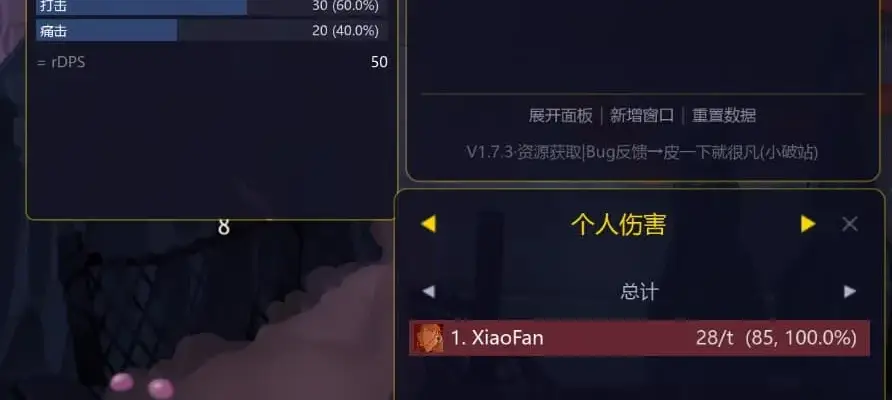
Files
Main File - Version v1.0 Latest
Jun 9, 2026 715 KB
Changelog:
Initial release
Description
Skada Damage Meter
WoW Skada-inspired combat analytics HUD for Slay the Spire 2
Skada is a damage meter that tracks combat stats in real time — per fight or across your entire run. It answers questions like: Who carried? Who slacked? Who didn’t play as a team?
Track damage, block, energy, card efficiency, and much more with detailed breakdowns and charts.
17 Stat Categories
Offense
Damage Dealt — Total damage output per player
DPT (Damage Per Turn) — Per-turn damage trend
Overkill — Wasted damage beyond lethal
rDPS (Raid DPS) — Assist damage attribution using a two-phase algorithm (additive + multiplicative). Tracks 9 powers: Vulnerable, Flanking, Knockdown, Slow, Weak, Shrink, Leadership, Strength, and Frail
Assist Damage — Damage you enabled for teammates
Defense
Damage Taken — Actual HP lost
Block Gained — Total block generated
Assist Block — Block you provided to teammates
Damage Prevented — Damage absorbed by block
Resources
Energy — Spent vs. wasted energy
Cards Played — Total cards used
Card Flow — Draw, discard, exhaust, retain
Card Efficiency — Damage per energy spent
Potions Used — Potion consumption tracking
Debuffs Applied — Debuff stacks dealt (including Strangle proportional split and Misery spreading attribution)
Analysis
Death Log — Timeline of lethal damage sources
Records — Lifetime bests: highest hit, best turn, most output, etc. Persisted across runs
Dashboard Features
Hero Summary — KPI cards per player (damage, block, cards, energy)
4-Tab layout: Offense / Defense / Resources / Analysis
Dynamic charts: Line charts, horizontal bar charts, trend graphs
Click any category card to drill down into details
Rich Tooltips
Hover any bar to see structured breakdowns — headers, stat lines, mini-bars, and contextual hints. 15 of 17 categories have detailed tooltips.
Multi-Window Support
Open multiple stat windows, each with independent category, view, position, and size
Drag edges to resize
Window positions and sizes persist across sessions
Compact Mode
Toggle a denser meter-only layout that hides footer controls — ideal for smaller screens or when you just want the numbers.
Data Persistence
Combat data saved to JSON — survives Save/Load and multiplayer disconnects
Records (lifetime bests) persist across all runs
Window layout (position, size, category) persists across sessions
Controls
Settings (via ModConfig)
Install ModConfig (optional) for in-game settings:
UI Scale — 50–200%
Font Size — 80–150%
Window Opacity — 30–100%
Max Bars per window — 3–30
Compact Mode toggle
Auto-reset stats on new run
Auto-switch to current fight view on combat start
Toggle hotkey (F7) and emergency reset-to-center hotkey
Installation
Extract the following files into:
text
<Game Install>/mods/DamageMeter/DamageMeter.dllDamageMeter.pckDamageMeter.json
Compatibility
Windows / macOS / Linux — Cross-platform (AnyCPU build)
Solo and multiplayer (2–4 players) with per-player color coding — also compatible with 5+ player mods
Bilingual: English & 简体中文 (auto-detected)
Zero Harmony — Pure public API architecture, maximum compatibility with other mods
Does not affect saves or gameplay
Requirements
This item needs the following to work. Install them as well:
Rate This Mod
—
0 ratings
★★★★★
Login to rate this mod.
This mod requires the following mods or tools to function properly:

VortexModder
Trusted Modder
47 mods · 1.2K total downloads
Related Mods
Slay The Spire 2  Slay The Spire 2
  Slay The Spire 2
  Slay The Spire 2