 Mewgenics
 Files
Main File - Version v1.0 Latest
May 14, 2026 49 MB
Changelog:
Initial release
Description
MewgenicsSaveEditorV4.1
Mewgenics Save Editor v4.1.0 is a standalone tool for editing save files and creating mods for Mewgenics. It allows you to modify cats, furniture, inventories, game settings, NPC progression, and unlocks, while also offering secure save handling with automatic backups.
This release now includes a built-in Mod Creator, a visual Furniture Editor with rare variants, an Inventory Editor, a Family Tree and Breeding Advisor, and support for 12 different languages. A Linux version is also available.
Special thanks to technolly10 for creating the banner. ❤️
Cat Editor
Edit a cat’s name, class, voice, appearance, gender, stat type, life status, and abilities. The ability section is organized into Active, Passive, and Equipment categories, with class-specific filters and clear visual grouping.
The editor supports 14 typed ability slots, including A1-A10 for active abilities and P1-P4 for passive ones, complete with in-game tooltip descriptions. It also includes 5 equipment slots—head, face, neck, weapon, and trinket—with binary parsing support.
You can adjust passive levels, edit base stats with full stat breakdowns, and manage mutations across 15 body parts with tooltip descriptions. Additional options include crown editing, life stage changes with an immortality bypass, level counter editing, and removal of birth defects or pedigree resets either individually or in batches.
You can also toggle statuses such as donated, injured, retired, dead, on adventure, or trashed, then filter cats accordingly for easier roster management. The editor supports active team cats, profile cats, archived cats, and winning-team cats.
Cats can be exported or imported as .mewcat files, duplicated, copied between saves, or handled through CSV import/export for stats and abilities.
Furniture Editor
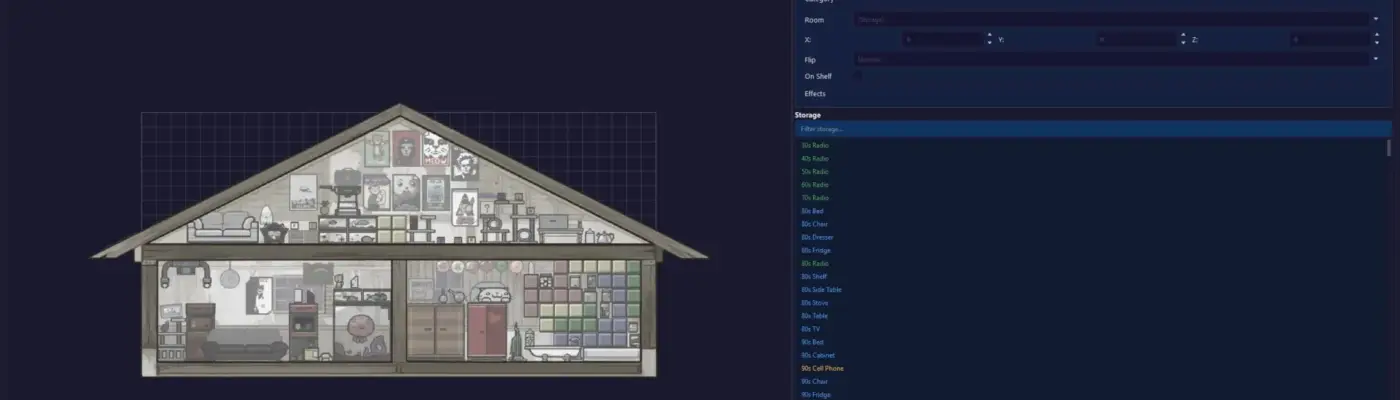
The Furniture Editor provides a visual house layout with room backgrounds and a grid overlay. Furniture can be placed using drag-and-drop with automatic grid snapping.
It includes 635 furniture sprites along with 624 rare variant sprites. You can toggle rare variants, apply the gold catalog badge, and enable a 2x effect multiplier.
All nine room types are supported, including Floor 1, Floor 2, Attic, Small Attic, and Basement levels 1 through 5. The editor also supports flipping furniture, proper sprite layering by depth, storage transfers, and room unlock tracking.
Inventory Editor
The Inventory Editor lets you browse and modify inventory items by category. New items can be added automatically with correct categorization and quest routing.
You can right-click certain items to edit their attached abilities, such as Glowing Bone, Meteors, or Learn Ability effects. A secondary name display also shows useful details like granted abilities, boosted stats, or taught disorders.
The interface uses a visual flow layout with mapped display names for easier item management.
Family Tree & Breeding Advisor
This section visualizes a cat’s lineage up to eight generations. It also includes a Safe Breeding view that ranks possible partners based on inbreeding risk.
The Room Advisor recommends the most suitable breeding pairs for each room, while the Perfect 7 Planner helps map out a long-term stat optimization path. It also includes pedigree diagnostics that can detect and repair Table 0 corruption.
Additional tracked details include gender, class, stats, breeding attributes such as libido and aggression, and status flags.
Mod Creator
The built-in Mod Creator, currently in early preview, allows full project-based mod development using the .msemod.json format. It supports 13 content categories, including abilities, items, passives, mutations, furniture, voices, text, characters, classes, NPC scripts, data files, assets, and audio.
The ability editor includes 13 templates such as melee, ranged, spell, and dash, along with support for target types, area-of-effect patterns, damage categories, and effect builders. You can create original entries, clone vanilla content, or patch existing vanilla files.
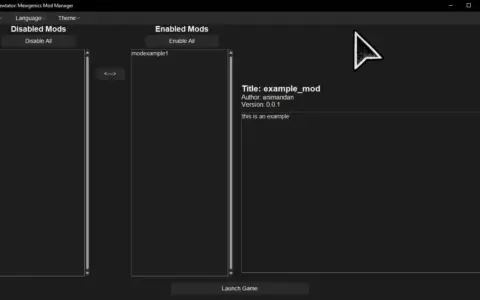
Existing mods can be imported from Mewtator or loose folders, then exported back into Mewtator-compatible packages, portable folders, or loose-file setups. The tool also supports asset importing for textures, SWF animations, audio, and other binary files, and can automatically detect the game folder, Mewtator installation, and installed mods.
Properties Editor
The Properties Editor allows you to change important save values such as gold, food, collars, current day, and storage upgrades. It also includes a selector for the next weather event with 59 weather types and a house boss difficulty selector with 8 levels.
Around 150 injectable properties are available across 10 themed categories, each with risk-level indicators. There is also an “Unlock All Safe Properties” preset, automatic discovery of extra save properties, searchable keys and descriptions, and contextual hints and warnings.
Property sets can be imported or exported as JSON, while sensitive values like Steam ID and random seed remain protected.
NPC Editor
The experimental NPC Editor lets you change building donation counters, mark quests as completed, and toggle special idol unlocks. It also allows you to queue side-quest items into storage.
Additional tools include a Steven save-scum reset that clears all three tracking systems, along with a “Neutralize Steven” option that injects SQLite triggers to permanently block save-scum detection.
Unlocks Editor
The Unlocks Editor includes seven categories: Classes, Active Abilities, Passive Abilities, Equipment Items, Bosses, Radio Songs, and Level Groups. Each category has its own Unlock All and Lock All controls.
There is also a single-click “Unlock Everything” option that applies to all seven categories. Unlock lists are searchable and use readable display names, while unknown entries remain preserved when saving.
Import / Export
The editor supports .mewcat files, including v1 and v2 reading with v2 writing support. You can export one cat or the entire roster, import a .mewcat into a chosen cat slot, or copy cats between different save files.
CSV export and import are available for spreadsheet workflows. Mod projects in .msemod.json format can also be created, opened, saved, imported, and exported.
For safer transfers, SHA256 integrity checks are included.
Localization
The editor supports 12 languages: English, French, Spanish, German, Italian, Portuguese (BR), Russian, Polish, Simplified Chinese, Traditional Chinese, Japanese, and Korean. Language can be switched directly in the settings while the app is running.
Community translation contributions are also welcome.
Backup & Safety
The tool warns users if Steam Cloud sync is enabled and recommends disabling it before editing saves. It also keeps the very first backup permanently as a pristine restore point.
A timestamped backup is created automatically before every save, with up to 20 rotating backups stored. Backup management and restore tools are built in, and pristine backups are clearly marked.
Saving uses an atomic transaction process, so nothing is written if validation fails. The editor also verifies edited data after writing and automatically rolls back if something goes wrong.
It can detect external file changes before reloading when unsaved edits exist, and it includes a crash handler that generates a crash.log file along with a startup error popup if needed.
Usage Guide
Important: Close Mewgenics before editing anything.
To edit cats, open MewgenicsSaveEditor, choose a save from the dropdown menu, go to the Cats tab, make your changes, and click Save All Changes.
To edit furniture, open the Furniture tab, move items on the visual canvas or between rooms and storage, then save your changes.
To create a mod, go to the Mod Creator tab, start a new project or import an existing mod folder, add or configure content, and export it in Mewtator or loose-file format.
To edit properties, open the Properties tab, change values such as weather, difficulty, or other editable settings, and save.
To edit NPC progress, open the NPCs tab, update quests, idols, counters, or items, then save.
To manage unlocks, open the Unlocks tab, toggle individual entries or use the Unlock All / Lock All options, and save your changes.
To restore a backup, open File > Restore Backup and select the backup by timestamp.
Installation
Windows
Download and extract the MewgenicsSaveEditor folder. Run MewgenicsSaveEditor.exe directly.
No installation is required, but the _internal folder must remain beside the executable.
Linux (Steam/Proton)
Download and extract the Linux build. Make the file executable with:chmod +x ./MewgenicsSaveEditor
Then launch it with:./MewgenicsSaveEditor
The app automatically detects save files from standard Steam and Proton locations. If Steam is installed in a different path, set STEAM_DIR=/path/to/Steam before launching.
Troubleshooting
“No save files found” — Launch the game once, then try again.
“Game is running” — Close Mewgenics before using the editor.
Changes not visible — Save in the editor, then restart the game.
Antivirus warning — The executable is unsigned, so it may need to be whitelisted.
Steam Cloud overwriting edits — Disable Steam Cloud for Mewgenics under Properties > General.
Linux: app won’t start — Install the required Qt library with
sudo apt install libxcb-cursor0.
Changelog
v4.1.0
This update adds full rare variant support to the Furniture Editor, including 624 accurate rare sprites, a toggle option, a gold catalog badge, and a 2x effect multiplier.
It also improves furniture positioning for certain 3-block items, redesigns the Cat Editor’s ability section with separate Active, Passive, and Equipment groupings, and adds binary parsing for five equipment slots. Passive tier editing, always-editable cat names, and item ability editing in the Inventory Editor have also been added.
Family Tree tools now include pedigree diagnostics and repair for Table 0 corruption, along with a progress dialog for lengthy repair jobs. Stability improvements include a crash handler, startup error popups, better traceback support, expanded ability data, and new localization keys across all 12 languages.
v4.0.0
Version 4.0.0 introduced the Mod Creator, Furniture Editor, Inventory Editor, Family Tree & Breeding Advisor, and a new localization system with 12 language options.
It also expanded the Cat Editor with crown editing, life-stage editing, immortality options, level counters, injury toggles, and adventure status support. Additional upgrades included smart ability validation, mod importing from Mewtator or loose files, a breeding simulator, a rewritten pedigree parser, and a cleaner modular project structure.
v3.0.1
This release fixed a crash caused by lowercase “none” being written instead of the required “None” value. It also resolved duplicate passive dropdown entries and parsing issues with cats that had 20 or more ability slots.
Tooltip descriptions were improved, and Linux-specific fixes were added for false game-running detection, save discovery, file dialogs, and folder opening on Steam Deck.
v3.0.0
Version 3.0.0 introduced a complete interface rewrite using PySide6 with a dark gaming theme. It also added the Unlocks tab, in-game tooltip descriptions for abilities and mutations, mutation editing by body part, injectable property editing, weather and boss difficulty selectors, gender editing, safer input controls, persistent window settings, external modification warnings, and a Linux build with automatic save path detection.
v2.1.0
This update added Steam Cloud sync detection, a permanent pristine backup system, detailed stat breakdown columns, decoded equipment mutation views, direct cat renaming, birth defect removal, pedigree resets, cat recall and unretire tools, Steven save-scum tools, and important fixes for NPC save parsing and blob verification.
v2.0.0
Version 2.0.0 significantly expanded the Cat Editor, improved the NPC editor, stabilized the .mewcat format with v2 writing and v1 reading support, strengthened the save pipeline, and improved the interface across multiple sections.
v1.0.0
Initial public release with support for cat editing, property editing, .mewcat handling, cross-save copying, and backups.
Rate This Mod
—
0 ratings
★★★★★
Login to rate this mod.

HexWarp
Trusted Modder
42 mods · 2K total downloads
Related Mods
Mewgenics  Mewgenics
  Mewgenics
  Mewgenics