 Directive 8020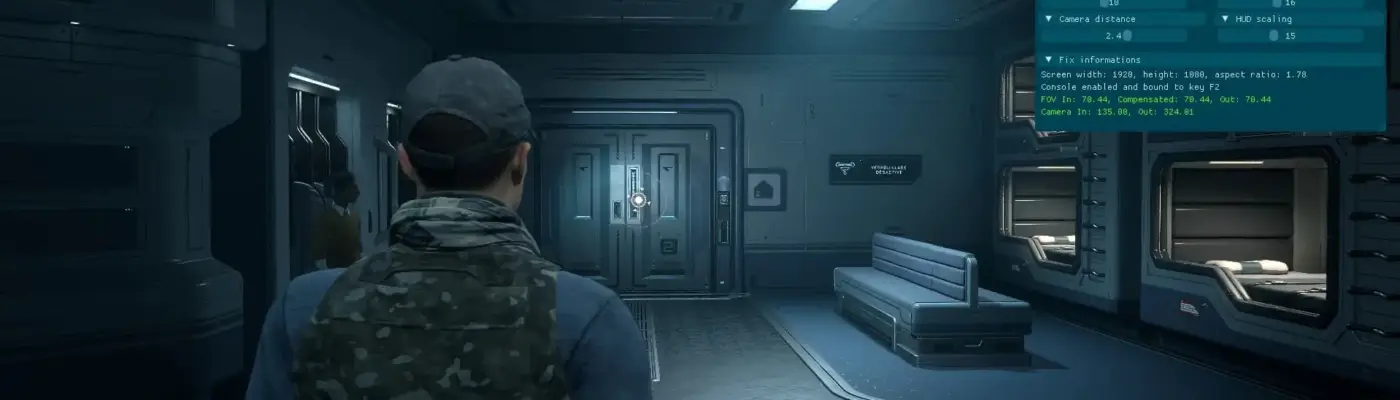
Files
Main File - Version v1.0 Latest
Jul 13, 2026 255 KB
Changelog:
Initial release
Description
Directive 8020 Ultrawide FOV and More
Reshade addon that restores the console and adds FOV and camera distance controls, ultrawide support, and options to disable certain visual effects.
Features:
– FOV adjustment in both gameplay and cutscenes
– Ultrawide support for cutscenes
– FMVs forced to 16:9 on ultrawide displays
– HUD/UI repositioning and scaling
– Camera distance control
– Console reactivation
– Toggleable visual effects
Installation:
1. Download Reshade with addon support (version 6.7.3 is required). If you have an older Reshade installed for this game, uninstall it first.
2. Install Reshade, point it to the game executable folder (SMG029UE5\Binaries\Win64) and select Directive8020-Win64-Shipping.exe.
3. Choose the DX12 API and any desired effects (optional), then complete installation.
4. Place the mod archive contents alongside Directive8020-Win64-Shipping.exe.
Usage:
– Launch the game; Reshade should appear after a few seconds.
– Press Home to open the main Reshade overlay, then reveal or dock the addon’s overlay.
– Enable the fixes by checking “Fix Enabled” and adjust sliders to taste.
Console:
– The console is bound to F2 once the main menu loads. Visual effect toggles require the console.
Cheats:
– Avoid cheats if you want the original gameplay. Available cheat: Time dilation (world & AI) via ALT + 1.
– Cheats can disrupt game events or progression—use at your own risk.
Enjoy.
Rate This Mod
—
0 ratings
★★★★★
Login to rate this mod.

ByteCrafter
Trusted Modder
44 mods · 683 total downloads
Related Mods
Directive 8020  Directive 8020
  Directive 8020
  Directive 8020