 Outbound
Files
Main File - Version v1.0.5 Latest
Jul 2, 2026
53 KB
Changelog:
Initial release
Description
Admin Menu
This mod introduces a powerful in-game admin panel for Outbound, accessible with a single key, offering a wide range of gameplay controls, cheats, and customization options.
Description
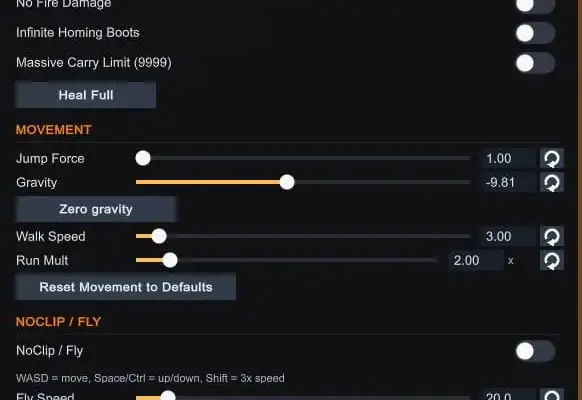
Admin Menu gives players full control over their Outbound experience through an extensive set of tools and cheat features. By pressing F3, you can open a comprehensive interface that allows you to modify player stats, movement physics, world conditions, and much more in real time.
It includes options like god mode, infinite stamina, no-clip flying, and instant healing, along with advanced controls such as teleportation, weather overrides, and time manipulation. You can spawn items, adjust gravity, refuel vehicles, and even unlock all achievements or blueprints instantly.
All settings are automatically saved as soon as they are changed, and they will be applied again the next time you launch the game. This ensures a seamless experience without needing to reconfigure options every session.
Key Features
-
Player enhancements such as full health, infinite stamina, fire and fall damage immunity, and increased carry capacity
-
Movement customization including speed, gravity adjustments, jump force, and no-clip flight mode
-
Equipment tools like instant backpack unlocks, flashlight controls, and vehicle refueling
-
World controls including time of day, time progression speed, and day cycle adjustments
-
Weather management with options ranging from clear skies to thunderstorms
-
Item and tool spawning with searchable lists and customizable quantities
-
Teleportation system with saved locations, predefined points, and look-based teleporting
-
Visual tweaks such as HUD overlays, fog removal, and lighting adjustments
-
Utility tools like resetting all cheats, fixing input issues, unlocking achievements, and exporting item data
Settings Persistence
All toggles and settings are automatically stored in a configuration file located in the BepInEx config folder. This allows your preferences, such as god mode or weather settings, to remain active across game sessions. Saved teleport locations are also preserved in a separate file and can be reset if needed.
Controls
-
Press F3 to open or close the admin menu
-
Use WASD along with Space or Ctrl to move while in no-clip mode
-
Hold Shift to increase movement speed during flight
-
Right-click to teleport to the location you are looking at when the feature is enabled
Installation
-
Download BepInEx 6, making sure to select the Unity IL2CPP (x64) version from the official website
-
The IL2CPP build is required, as the Mono version is not compatible
-
Open Steam, right-click Outbound, go to Manage, then select Browse Local Files
-
Extract the BepInEx files into the game directory so that winhttp.dll is placed next to Outbound.exe
-
Launch the game once and wait for it to reach the main menu, then exit. This step prepares required files and may take a few extra minutes
-
Extract the mod archive into your Outbound folder, placing OutboundAdminMenu.dll inside Outbound/BepInEx/plugins
-
Start the game and press F3 to open the admin menu
Game Pass Notes
For Game Pass or Xbox app users, an additional compatibility patch is required. Download the patch and place FieldDefaultValueFix.dll into the BepInEx/patchers folder before installing the mod. It may also be necessary to temporarily disable antivirus software or whitelist the game folder to prevent files from being removed during installation.
Verifying Installation
Launch the game and press F3. If the menu appears, the mod is working correctly. If not, check the BepInEx log file for errors. A successful load should include messages confirming that the admin menu has been initialized.
Uninstall
-
Remove OutboundAdminMenu.dll from the BepInEx/plugins folder
-
Optionally delete the configuration file in the BepInEx/config directory to reset all saved settings
Rate This Mod
—
0 ratings
★★★★★
Login to rate this mod.

GlitchMancer
Trusted Modder
48 mods · 1.1K total downloads
Related Mods
Outbound
 Outbound
 Outbound
 Outbound